What each simulator offers
Choose which cars, tracks and weather presets each simulator shows, and which modes are available. Weather and race time of day can be left to the driver or fixed.
Sim racing kiosk software
Omnisim's kiosk software runs on every simulator. It waits on your screensaver, unlocks on a valid QR code, walks the player through their choices with the wheel, starts Assetto Corsa and locks itself again when the time is up.
On every simulator
Omnisim has two parts: a browser-based dashboard (NEXUS) where you run the center, and kiosk software (IGNITION) installed on each Windows simulator. The kiosk side is what your customers see. It welcomes them, checks their ticket, lets them set up their race and starts Assetto Corsa for them.
Nobody needs to walk over to type a car name, open Content Manager or reset the game between two customers. A player with a valid QR code goes from the screensaver to the track on their own, and the simulator is locked and ready for the next one when they leave.
Settings you change in the dashboard (cars offered, difficulty, screensaver, languages) reach the simulators without anyone stepping in on site.
Player journey
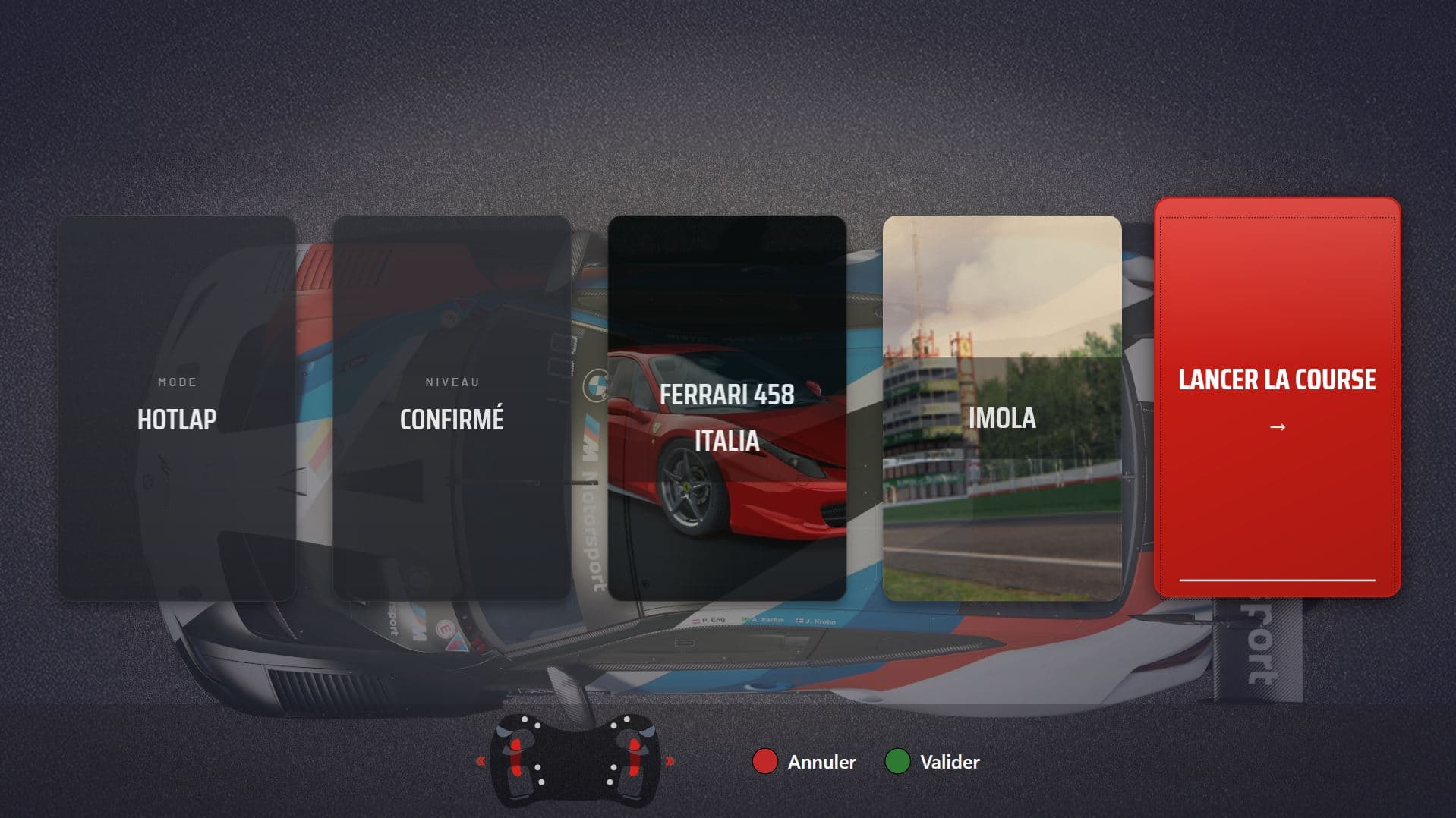
Players move through the menus with six controls mapped to wheel buttons, paddles, pedals or a D-pad. A hint bar at the bottom of the screen shows which button does what.
The simulator shows your screensaver until a QR code is scanned. It checks with the platform that the ticket is valid in this center, for this simulator type and at this time, then unlocks. A refused ticket shows the reason on screen: expired, used up, wrong center, wrong simulator type, outside its time slot, daily limit reached.
An online ticket keeps the language it was booked in. Otherwise the player can pick their language, among those your center offers. A ticket bought online already carries the customer's name; a counter ticket asks for a username (3 to 16 characters, moderated) that appears on the leaderboards.
Circuit, Rally or Drift in Assetto Corsa, then Hotlap, Practice, Race or Multiplayer, then Novice, Intermediate or Expert. The experience screen is skipped when only one is playable, and a mode only appears if at least one active car and track suit it.
Only cars with at least one playable track in that mode are listed, then compatible tracks. Weather and race time of day appear only if you leave them to the driver; otherwise your defaults apply.
One card per choice; touching a card goes back to that screen. Start race launches Assetto Corsa. The session clock only starts once the car is on track: loading time is not counted.
When the ticket's time is up or the player quits, a results screen lists every lap with three sectors, validity and the best valid lap for 15 seconds. The simulator then returns to the screensaver, locked. Another session means scanning the ticket again.
Session time
A self-service floor only works if players trust the clock. Omnisim deducts credit at the real end of a session, and only for the time spent driving. Loading, the starting grid and the menus are free.
If a player stops early with 10 seconds or more left, the session is not used up: the remaining time stays on their QR code and is given back at the next scan. If Assetto Corsa fails to load, nothing was driven, so nothing is deducted.
Multiplayer
One simulator creates the race and becomes the host; the others join it from a lobby on the same local network, up to 12 cars including the host. The host picks the track, weather and time of day, and guests choose their car from those the host allows. When everyone is in, the host starts the race and every simulator launches Assetto Corsa on it.
The host's ticket sets the race length. A guest with a longer ticket drives the host's duration and keeps the unplayed time on their QR code. Simulators don't need a Steam account each (a local identifier is used instead), and the installer opens the Windows firewall ports the lobby needs.
What you control
Everything below is set from the dashboard or on the simulator, once, and then applies to every session.
Choose which cars, tracks and weather presets each simulator shows, and which modes are available. Weather and race time of day can be left to the driver or fixed.
Novice, Intermediate and Expert are fully configurable: driving aids, wear and damage, 1 to 17 AI opponents and their level, number of laps, penalties.
Your video or image (up to 200 MB) on the locked screen, with your logo, a QR code that sends passers-by to your booking page, and a showcase of your cars and tracks.
Take a simulator out of service from the dashboard, with a staff command QR code or on the simulator itself. It locks and shows SIMULATOR UNAVAILABLE or your own image; customer tickets are refused without being charged.
For a private evening or a trade show, switch a simulator to free access: no ticket, each player enters a username and drives for the default session length. A dated command QR code relocks it at the end date.
The settings button on the simulator can be protected by a 4-digit PIN, so players can't change what you configured. An optional auto-launch starts a Novice Hotlap after a countdown if the player doesn't choose.
Running with a small team
With tickets sold online and validated at the simulator, the counter no longer has to start games, watch the clock or reset a rig between customers. Players book, scan, race and leave; the simulator locks itself behind them. That is how a center can run with few people on the floor, or none at the counter for customers who bought online.
Some things still need you. Each simulator needs a QR reader (most USB readers work out of the box, in keyboard or COM port mode) and a permanent internet connection. A race in progress is not lost if the connection drops: the player finishes and the laps are sent when it comes back. But no new session can start offline. Omnisim sells no hardware and has no card terminal: a ticket sold at the counter is issued in the dashboard and paid outside Omnisim.
Remote monitoring of the fleet is covered in sim racing fleet management, and selling sessions, booklets and passes online in sim racing booking software.
Assetto Corsa (the original game), with its Circuit, Rally and Drift experiences. Assetto Corsa EVO and Assetto Corsa Rally are announced as coming soon, with no date. Other sims are not supported.
No. Each simulator needs Windows 10 or 11, Assetto Corsa installed through Steam on an account that owns it, a permanent internet connection, a wheel and pedals, and a QR reader. Content Manager and CSP are not required, and there is no other software to install.
Most USB QR readers work without setup. The software listens to both keyboard-emulation (HID) and COM port readers at the same time. The manual shows how to connect and set up the QR reader.
The race continues to the end and the laps are kept, then sent when the connection returns. While the simulator is offline, new scans and launches are refused with an 'Internet connection lost' message: no session starts without being recorded.
No, and they don't lose time either. The session is charged on the time actually driven; with 10 seconds or more left, the remaining time goes back on their QR code for the next scan.
Yes. Free-access mode removes the ticket: each player types a username and drives for the default session length. Switch it on with a command QR code that has an end date, and the simulator relocks itself when that date passes.
13: French, English, Spanish, German, Portuguese, Italian, Dutch, Polish, Russian, Japanese, Chinese, Korean and Arabic. Each center picks its languages and default language; players can choose theirs when they unlock, and an online ticket keeps the language of the booking.
See also
Install the kiosk software on your simulators and run your first self-service session during the 14-day free trial. No credit card required.