Time zone
It sets the hours at which products are on sale on the booking page, the day a dated ticket expires, the daily count of passes, challenge dates and the time of alerts. Two centers in different time zones each run on local time.
Multi-location sim racing software
Each venue keeps its own simulators, products, booking page and leaderboards. You see them one at a time or all together, and your managers only see the sites you give them.
How it is organised
In Omnisim, your company is the account and each physical venue is a center inside it. A center carries its own simulators, prices, booking page and leaderboards, so opening a second site does not mean starting a second account or merging two sets of data later.
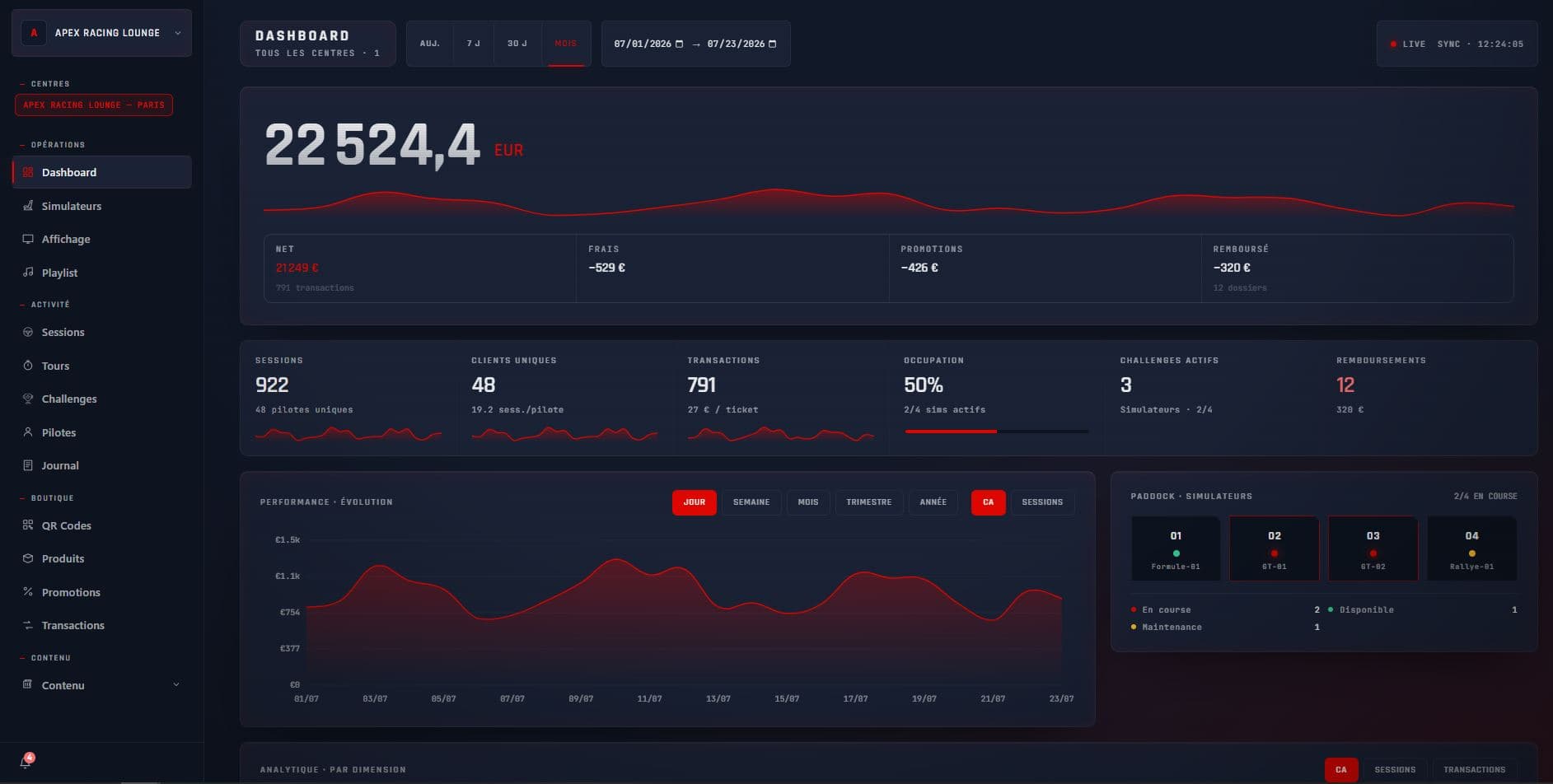
A center selector sits at the top of the Omnisim dashboard. Every page (simulators, sessions, laps, QR codes, transactions, statistics) shows the centers currently selected: one venue to deal with a local issue, or all of them to read the network as a whole.
Settings work the same way. Change the time zone, languages or theme with three centers selected and the change is written to all three; when their values differ, the dashboard warns you before you overwrite them.
Per center
A network is rarely uniform: a city-centre lounge and a family leisure park do not sell the same thing at the same hours. These settings belong to the center.
It sets the hours at which products are on sale on the booking page, the day a dated ticket expires, the daily count of passes, challenge dates and the time of alerts. Two centers in different time zones each run on local time.
Each center picks its languages among 13 and its default language, used on the simulators and the booking page. Players can switch language when they unlock a simulator.
Sessions, booklets and passes are created per center, each with its own public booking page. A promo code can be valid in one center or several.
Light or dark theme, primary and secondary colors and logo apply to the center's simulators, booking page, leaderboard and QR emails. Emails can go out in the company's name or the center's.
Each center ticks the equipment types it offers (Formula, GT, Rally, Kart or your own), which drive the products it can sell.
Notification preferences (simulator offline, input device disconnected, Assetto Corsa crash, low disk…) are set per center.
Across the network
Besides each center's page, a company booking page groups all your centers, so a customer can pick the venue closest to them.
A challenge can span several centers as a single competition with one leaderboard. Drivers in different venues chase the same time. Details on our sim racing leaderboards and challenges page.
Public leaderboard and calendar pages exist per center or for all centers, with a layout made for the TV in your lounge.
A car or track installed on one simulator can be shared with others, including simulators in another center, over the internet. Copies run while simulators are idle.
All your centers collect into your company's own Stripe account. Omnisim takes no commission on customer payments; Stripe's fees apply.
Team
Everyone who works in the dashboard has a personal login. Administrators see every center, plus the subscription, the Stripe connection and the team. Users only see the centers you assign to them, with one of four roles.
A role can be adjusted person by person with advanced permissions. Removing someone's access is immediate, their history stays, and an access log records every invitation, change and removal. An account holds up to 15 people, pending invitations included.
Done by an administrator, from the dashboard. There is no server to install on site.
Name, time zone, languages, logo and the simulator types it will offer. Once your Stripe account is connected, a new center takes that account's country.
Create its products and theme, or select it together with an existing center to copy settings across in one go.
Run the Omnisim installer on each PC. The same license key covers all your simulators, up to the number you subscribe to, whatever center they sit in.
Invite the manager and front-desk staff with that center ticked, and pick their role.
When a site closes
Archiving is the normal way to retire a center that has had activity. Its public pages (booking, calendar, leaderboard, display) close, its simulators stop accepting scans and their licenses are freed. Sessions, laps, QR codes and payments stay intact for your accounts.
It can be undone: unarchive the center and its simulators are reactivated within the seats of your subscription. Archiving does not lower your bill on its own; you adjust the number of simulators in billing.
No. Omnisim is priced per simulator, so a second or tenth center adds no fee of its own. You pay for the simulators you run, wherever they are. The current rates are on the Omnisim pricing page.
Yes. Products, booking page, time zone, languages, colors and logo are set per center. Emails can be sent in the company's name or the center's.
Yes. Invite them as a user, tick their center and give them the Center manager role (or Front desk, Technician, Read only). They will not see the other centers, billing or the Stripe account.
No. One account means one Stripe account: all centers collect into it, and a Stripe account can only be linked to one Omnisim company. The sales currency is the company's, set by its country at sign-up, and cannot be changed afterwards.
Each center counts its own days in its own time zone. When you select several centers with different time zones, dashboard pages count days in the first center's time zone and say so on screen.
Yes. A challenge can cover several centers as a single competition with one leaderboard, and the public leaderboard can show all centers together.
Up to 15 people per account, pending invitations included. Removing someone's access frees their seat.
See also
14 days, no credit card. Create your centers, invite a manager and see the network view for yourself.