Any screen with a browser
A smart TV, or a monitor connected to a PC. On an old TV whose browser cannot open the page, a streaming stick or mini-PC on the HDMI input does the job.
Sim racing leaderboard software
Pick a track, a few cars and two dates. Every matching lap driven on your simulators lands on a public leaderboard a few seconds later, with nobody typing a single time.
Challenges
You create a challenge in the Omnisim dashboard: one track, one or more allowed cars, a start date and an end date, the difficulty levels whose laps count, and optionally "valid laps only". Add a cover image and a name your drivers will recognise, and you are done.
There is nothing to configure on the simulators. A challenge does not live on the rig: it sorts the laps the rigs already send. That is why it is retroactive. Create it, or change it, halfway through its period and the laps driven since the start date are counted.
A challenge can run in one center or in several. Across several centers it is a single competition with a single leaderboard, which shows each driver's center. Each center can have up to four challenges running on the same day.

The order matters here: each step feeds the next without anyone at the front desk.
They scan their QR code, or simply type a username if the simulator is in free access. That username is the name shown on the leaderboard.
In the regular self-service flow on the simulator: no special mode to pick, no code to enter.
More than two wheels off track invalidates the lap automatically. The difficulty level is read from the stability aid used during the lap.
A few seconds after the lap ends, without reloading the page, on every screen and phone showing that challenge.
Once finished, the leaderboard is frozen and the public calendar offers a Results button with the final standings.
Public leaderboard
Each center gets a public leaderboard page, and your company gets one that gathers all its centers. No account is needed to open it: put it on a screen, send the link to your drivers or print it behind a QR code.
Up to four live challenges sit side by side. Each block shows the time to beat and, for every driver, the car, the assist level, the lap time, the gap and the three sectors. One line per driver, with their best lap; a valid lap always ranks ahead of an invalid one, even a faster one.
The page picks its layout by itself. On a TV or a monitor everything fits the screen height and long lists page every 30 seconds with a progress bar. On a phone or a touch tablet it scrolls, with tabs to switch between challenges. A TV keeps the venue layout whatever its width.
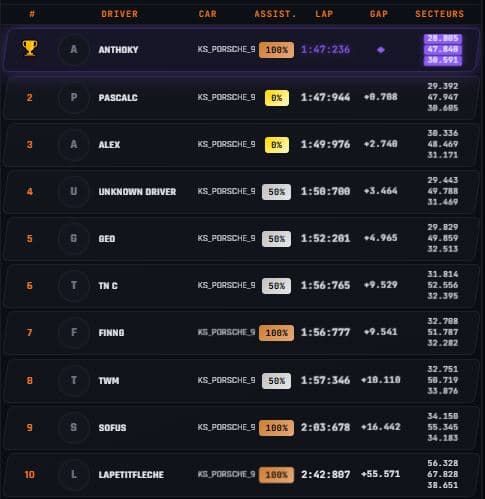
Center screens
The Display page builds a loop for each center: your videos and images, plus the live leaderboard and the challenge calendar. The screen only needs a browser and one address.
A smart TV, or a monitor connected to a PC. On an old TV whose browser cannot open the page, a streaming stick or mini-PC on the HDMI input does the job.
Videos (MP4, MOV, WEBM, up to 200 MB) and images (JPG, PNG, WEBP, GIF, up to 10 MB). The library holds 10 videos and 10 images per account; videos play muted and in full.
Add them like any other item. Default durations: 30 s for the leaderboard, 25 s for the calendar, 10 s for an image. Drag to reorder.
It checks the loop every minute and applies changes on its own. If the connection drops, it keeps showing what it had and retries.
The address is the only key to the screen. Regenerate it and the old one stops working at once.
Fair play
A lap with more than two wheels off track is invalidated automatically. Staff can validate or invalidate any lap by hand from the laps list.
Choose which difficulty levels count. A lap's level is read from the stability aid used: 25% or less counts as Expert, up to 75% as Intermediate, above that as Novice.
Tick the option and invalid laps disappear from the leaderboard and calendar. Leave it off and they appear after all valid laps, marked INVALID.
Usernames are 3 to 16 characters and moderated. A username already taken requires the matching email address.
Why it pays
A time on the wall gives your drivers something to beat on their next visit. The public calendar shows challenges coming up, running and finished, and its Participate and Book buttons lead straight to your booking page. If you sell online, running challenges also appear as a banner on that booking page.
For a private evening or a trade show, switch simulators to free access: no ticket, each player types a username and drives for your default session length, and their laps still feed the challenge leaderboard. The rig locks itself again at the end date you set.
With several venues, one challenge can pit all of them against each other on the same leaderboard, while each center keeps its own page and its own screens.
No. Laps come from the simulators automatically. Any lap driven with an allowed car, on the challenge track, at an allowed difficulty level, between the two dates and in a participating center enters the leaderboard, including laps driven before the challenge was created. The manual walks through how to create a challenge.
Any screen with a web browser: a smart TV or a monitor connected to a PC. If an older TV cannot open the page, plug a streaming stick or mini-PC with an up-to-date browser into its HDMI input and open the link full screen.
Yes. A challenge spanning several centers is one competition with one leaderboard, which shows each driver's center. Each center can also run its own challenges, up to four on the same day.
More than two wheels off track invalidates the lap automatically, and staff can validate or invalidate a lap by hand. Invalid laps always rank behind valid ones, or are hidden entirely if you enable valid laps only. Each driver appears once, with their best lap.
Yes. The same public link shows a scrolling mobile layout on phones and touch tablets, with tabs to switch between challenges. No account or app is needed.
Yes, if the simulator is in free access. Each player types a username before driving and their laps are ranked under that name.
No. Omnisim challenges are best-lap competitions between two dates. There are no seasons, points tables or race director tools. You can schedule challenges back to back on the calendar to build a series.
See also
Start a 14-day free trial, no credit card required, and run a challenge on your own simulators.