Session
One game of a fixed duration. The simplest product for walk-ins and first-timers.
Sim racing booking software
Your customers buy a session, a booklet or a pass on your booking page, pay by card and receive a QR code by email. They scan it on a free simulator, and only the time they actually drive comes off their credit.
How it works
Omnisim is built around a simple model: the customer buys a product, receives a QR code and drives on whichever simulator of the right type is free when they arrive. There is no reservation calendar where a customer picks rig 3 at 15:00, and no staff schedule to manage.
Each center gets a public booking page. The customer chooses a simulator type and a product, enters a username and an email address, accepts your terms and pays. The QR code arrives by email, ready to scan at the simulator.
You still control when things happen. Every product has an availability calendar: it is on sale and usable only in the time slots you tick, which is how you build an off-peak offer or keep a product out of your busiest evenings. Those slots follow your center's time zone.
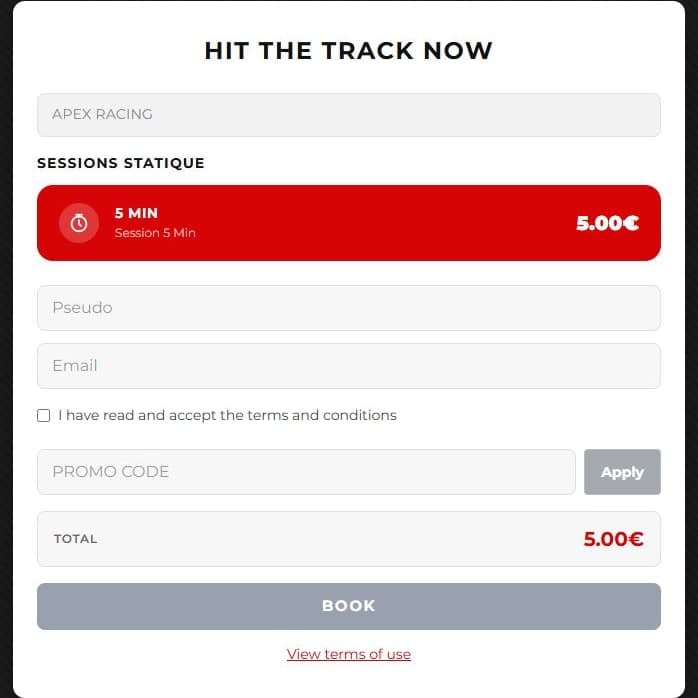
On your booking page, they choose a simulator type (Formula, GT, Rally, Kart… whatever types you define) and a session, booklet or pass. A promo code can be applied before paying.
Payment runs through Stripe Checkout on your own Stripe account. The customer must accept your terms and conditions before paying.
The ticket keeps the language the customer booked in. If the email fails, Omnisim retries automatically for 24 hours, and your staff can download the QR image and send it themselves.
The simulator checks with the platform that the ticket is valid in this center, for this simulator type, at this time, then unlocks. Each simulator needs a QR code reader; most USB readers work out of the box.
Only the time actually driven is deducted, once the session has really ended. Loading, the grid and the menus are not counted.
Products
Each product targets one of your simulator types and has its own price, session duration, validity and availability calendar.
One game of a fixed duration. The simplest product for walk-ins and first-timers.
Several sessions of the same duration on a single QR code. The customer comes back with the same ticket until the sessions are used up.
Valid until a date, with a maximum number of sessions per day: the product for regulars and monthly memberships. A pass can cover several simulator types.
Set the same daily maximum every day (1 to 99), or one per weekday (0 to 99). A 0 closes the pass that day, for example to keep weekends for other customers.
A product is valid for a number of days after purchase (1 to 3,650), or until a fixed end date, so every buyer expires at the end of the same day, center time.
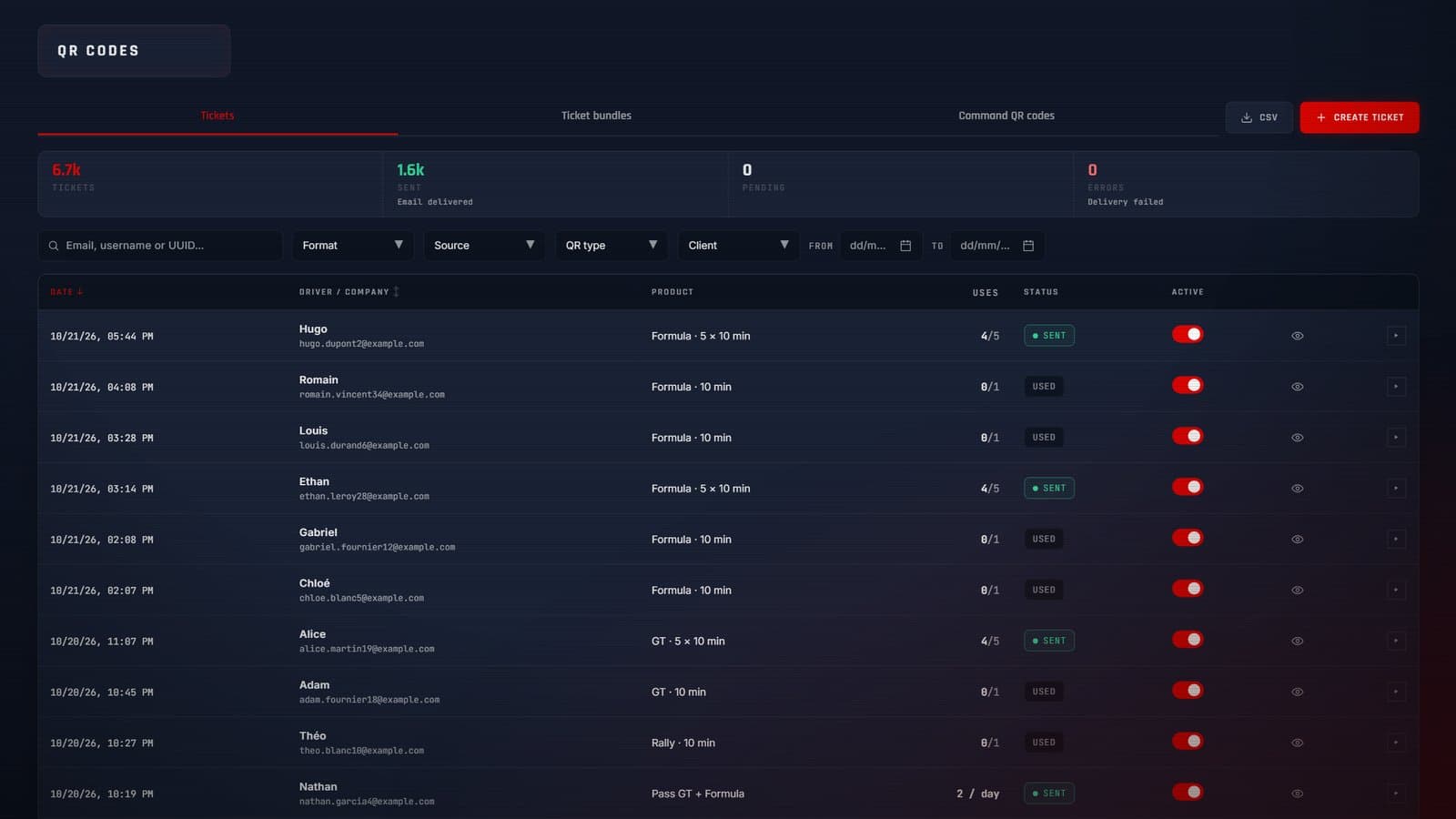
Individual products are sold on the booking page; company products are issued from the dashboard. For a seminar or a works council, print several separate QR codes in one PDF, with your logo, duration, uses and validity.
Payments
You connect your own Stripe account in a few clicks (Stripe Connect). Customer payments land in that account, then in your bank account. Omnisim routes the payment but never collects the money on your behalf, and takes no commission on your sales. Stripe's own processing fees still apply.
One Stripe account is used per company: if you run several centers, they all collect into the same account. Online payment is a one-time card payment through Stripe Checkout.
Fair use of credit
Credit is deducted only at the actual end of a session, and only for the time spent driving. If a player stops with 10 seconds or more left, the use is not spent: the remaining time stays on the QR code and is given back at the next scan. If Assetto Corsa fails to load, nothing is deducted.
One QR code works on one simulator at a time. Scanning it again on the same simulator locks or unlocks it without deducting anything. For a pass, a session only counts towards the daily maximum when it actually uses up a session, so an interrupted race never eats into the day's allowance.
When a ticket is refused, the simulator says why in its own language: expired, used up, wrong center, wrong simulator type, outside its time slots, daily limit reached. The player journey on the simulator itself is covered on our sim racing kiosk software page.
Selling tools
A percentage (1 to 100%) or a fixed amount, single use per email or reusable, with a maximum number of redemptions and an optional expiry date. The code is checked again at payment.
Restrict a code to some products, to known customers by email, or to time slots for a happy hour. A code can be valid in one center or several.
Each simulator's screensaver can show a QR code that opens your booking page with that simulator's type already selected.
Light or dark theme, your colors and logo. The page is shown in the languages you choose for your center, among the 13 Omnisim supports.
Besides each center's page, a company-wide booking page groups all your locations. Running several sites is covered on our multi-location sim racing software page.
Limit how many products of a simulator type are on sale at the same time, so your offer stays readable.
No. Omnisim does not offer time-slot reservations on a given rig. Customers buy a session, booklet or pass and receive a QR code, which they scan on any free simulator of the right type. You can limit each product to certain time slots with its availability calendar, for example an off-peak offer.
No. Payments go to your own Stripe account through Stripe Connect, and Omnisim takes no commission. Stripe's processing fees still apply.
Card payment through Stripe Checkout, as a one-time payment. Customers who pay at your front desk can be issued a ticket from the dashboard; that payment is taken outside Omnisim.
Yes, as a pass: valid for 30 days after purchase (or until a fixed date), with a maximum number of sessions per day that you can set per weekday. The pass is paid once; Omnisim does not handle recurring charges.
If 10 seconds or more are left, the session is not used up: the remaining time stays on the QR code and is given back at the next scan. Only the time actually driven is deducted: the manual details how a QR code's credit is used.
Yes. Company products are issued from the dashboard, and you can print a PDF bundle of separate QR codes (1 to 5 tickets per page) with your logo, the session duration, simulator type, uses and validity.
No. Omnisim has no gift card or voucher product today. What you sell online are sessions, booklets and passes, each delivered as a QR code.
See also
Create your products, connect your Stripe account and start selling. 14-day free trial, no credit card.